An electric scooter beeps primarily due to a low battery, engaged brake sensors, throttle malfunctions, or internal error codes. These audible warnings are diagnostic tools designed to signal issues within the system, protecting components and ensuring rider safety. Understanding these alerts is crucial for maintaining performance and preventing unexpected shutdowns.
This guide explains the most common reasons your electric scooter might be beeping and provides five straightforward, do-it-yourself fixes. You can troubleshoot and resolve many issues without professional help, getting you back on the road with confidence.
Understanding Electric Scooter Beeps: A Troubleshooting Guide
An electric scooter’s beeping is not just an annoying noise; it’s a built-in diagnostic tool designed to communicate specific issues within its system. These audible alerts protect the scooter’s components from damage and ensure rider safety by flagging problems that could impact performance or lead to unexpected shutdowns. Decoding the meaning behind these beeps is the first step toward effective troubleshooting.
Many scooters use different beep patterns or flashes on their display to indicate various error codes, much like the diagnostic systems in cars. For instance, a series of short beeps might indicate a low battery, while a combination of long and short beeps could point to a sensor fault. Consulting your scooter’s user manual is always the definitive way to understand its specific beep codes. Ignoring these warnings can lead to more significant problems down the line, potentially causing costly repairs or leaving you stranded.
Common Reasons Your Electric Scooter Is Beeping
Electric scooter beeping can stem from a variety of sources, each signaling a different type of problem. Pinpointing the exact cause often requires a systematic check of your scooter’s key components.
One of the most frequent culprits is a low or disconnected battery. Many scooters are programmed to beep when the battery charge drops to a critically low level, serving as a reminder to recharge before the power completely depletes. This safety mechanism prevents unexpected shutdowns that could leave you stranded or cause accidents. Similarly, a battery that is not securely connected can also trigger these warnings, disrupting the power flow to the system.
Another common reason is error codes being generated by the scooter’s internal diagnostic system. These codes can signal a range of faults, including issues with the motor, controller, or other electronic components. Manufacturers often provide a list of these codes and their corresponding beep patterns in the user manual, making it crucial to refer to this document when a persistent beeping occurs.
Brake sensor activation or faulty brake components can also cause your scooter to beep. If a brake lever is partially engaged, stuck, or if there’s an issue with the brake sensor itself, the scooter’s safety system might prevent movement and emit a warning sound. This feature is designed to prevent accidental acceleration while the brakes are active, highlighting the importance of a properly functioning braking system for rider safety.
Throttle signal issues or a malfunctioning throttle can lead to erratic behavior, including beeping. A damaged, misaligned, or stuck throttle can send incorrect signals to the controller, leading to the scooter’s system registering an error. Such issues prevent proper acceleration and can be a significant safety concern.
Furthermore, overheating of the motor or controller is a protective measure that triggers beeping. Prolonged use, especially in hot weather or on steep inclines, can cause internal components to reach unsafe temperatures. The scooter will beep and often limit performance or shut down to prevent permanent damage to these critical parts.
Less common but still possible causes include loose or damaged wiring and connections throughout the scooter’s electrical system, software or firmware glitches that can cause temporary malfunctions, or even the activation of a speed limiter if the scooter detects it’s exceeding its programmed maximum speed. Occasionally, simple things like an incorrectly locked seat on a mobility scooter or an obstruction in the wheel path can also trigger alerts, although these are less common for typical stand-up electric scooters.
5 Quick DIY Fixes for a Beeping Electric Scooter
When your electric scooter starts beeping, it’s often a call for immediate attention. Before you rush to a repair shop, many common issues can be resolved with a few simple DIY checks and fixes. Here are five practical steps you can take to diagnose and potentially silence that persistent beep.
1. Check Battery Status and Connections
|
Our Picks for the Best Electric Scooter in 2026
As an Amazon Associate I earn from qualifying purchases.
|
||
| Num | Product | Action |
|---|---|---|
| 1 | ZIFFY Scooter for Kids with Hand Brake, Foldable Kick Scooter for Ages 6-12, Lightweight Scooter for Boys with 4 Adjustable Heights, ABEC9 Bearings, Supports Up to 260 lbs by Jova |

|
| 2 | JBM Adult & Kid Skating Protective Gear Set for Beginner to Advanced, Skateboard Helmet Knee and Elbow Pads with Wrist Guards for Inline Roller Skating, Scooter, Skateboarding |
|
| 3 | Electric Scooter for Adults Kukirin G4/G2/G2max, 60V2000W Motor Fast Scooter 43MPH&47 Miles Range, 11 Inch Off-Road Tire Long Range Electric Scooter for Adults |
|
| 4 | Aero Big Wheels Kick Scooter for Kids 6+, Teens & Adults | Light Up Wheels, Hand Brake, Rubber Deck Mat & Shock Absorption | Foldable & Height Adjustable |
|
| 5 | isinwheel GT1/GT2 Electric Scooter Adults, 28 MPH Top Speed, 28/37Miles Range, 800/1000W Motor, 330LBS Load, Off-Road Scooter for Adults with Turn Signal (2025 Upgraded Version) |
|
| 6 | Aero Big Wheels Kick Scooter for Kids 6+, Teens & Adults | Light Up Wheels, Hand Brake, Rubber Deck Mat & Shock Absorption | Foldable & Height Adjustable |
|
| 7 | Scooters for Kids 8-12, Teens & Adults - Foldable Commuter Scooter with Bell, Hand Brake & Adjustable Height, 220 LB Weight Capacity, Perfect for School, Campus, Park Rides |
|
| 8 | Electric Scooter for Adults, Up to 19/23/25Miles, Built in Side/Turn Light, 8.5/10" Honeycomb Solid Tires, Folding E-Scooter with Front/Dual Suspension |
|
| 9 | Off Road Electric Scooter for Adult, 48V 13AH Folding E-Scooters, 800W Motor up to 25Mph & 28Miles Range,10" All Terrain Tire Scooter with Dual Suspension & Turn Signal Light |
|
| 10 | Caroma Peak 800W/1200W Electric Scooter with Seat, Max 15/20/30Miles&20MPH, 14"/20" Tires Foldable Adult Electric Scooter with Basket for Pets & Cargo, Dual Shock Absorbing EScooter for Commuting |
|
A low battery is one of the most common reasons an electric scooter will beep. Most scooters have a built-in warning system to alert you when the battery charge is critically low. This prevents sudden power loss and potential accidents.
- Action: First, check your scooter’s display for the battery indicator. If it’s flashing or showing a low charge, plug in your scooter and allow it to charge fully.
- Inspect connections: Even if the battery shows a charge, a loose or improperly seated battery connection can interrupt power flow and trigger beeps. Ensure the battery is firmly secured in its compartment. Gently check all visible battery terminal connections for tightness and any signs of corrosion. If you see any corrosion, carefully clean it with a brush.
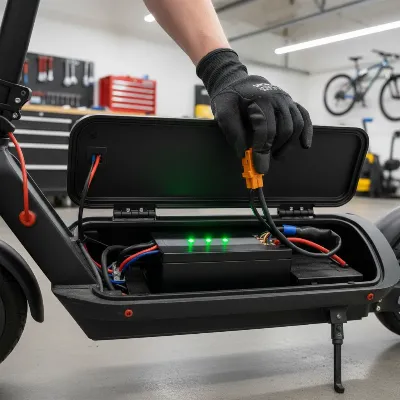 Hand checking electric scooter battery connections and charge status
2. Inspect Brake Levers and Sensors
A safety mechanism in many electric scooters will cause them to beep if the brake lever is even slightly engaged. This is to prevent accidental acceleration while the brakes are active.
- Action: Ensure both brake levers are fully disengaged and return to their neutral position freely. Sometimes, a brake lever can get stuck due to dirt, debris, or a minor misalignment. Gently jiggle each lever to confirm it’s not sticking.
- Check brake sensors: Some scooters have sensors that detect brake engagement. If these sensors are faulty or obstructed, they can falsely trigger a warning. Inspect the area around the brake levers for any visible damage or loose wires connected to the sensors. Clean any dirt or debris that might be interfering with the sensor’s operation.
3. Examine Throttle for Malfunction
Similar to brake issues, a malfunctioning throttle can send incorrect signals to the scooter’s controller, causing it to beep and potentially prevent movement.
- Action: Test the throttle for smooth operation. It should move freely and return to its resting position without sticking. If the throttle feels stiff, wobbly, or doesn’t spring back, it might be faulty.
- Check connections: Inspect the throttle’s wiring connection to the main scooter body. Look for any loose plugs or damaged cables. Re-seat any connections that appear loose. In some cases, a damaged throttle cable can be the culprit, requiring replacement.
4. Check for Loose Wiring and Connections
Electric scooters are packed with internal wiring and connectors. Over time, vibrations from riding or minor impacts can cause these connections to loosen, leading to intermittent problems or constant beeping.
- Action: This step requires a bit more care. If you are comfortable, carefully open the scooter’s deck or inspect easily accessible wiring harnesses. Look for any visible loose wires, disconnected plugs, or signs of frayed cables. Pay particular attention to connections leading to the motor, controller, and display.
- Secure connections: Gently push in and secure any loose plugs. If you notice any frayed or damaged wires, it’s generally best to have them professionally repaired or replaced to ensure safety and proper function. However, sometimes simply re-seating a loose connector can solve the problem immediately.
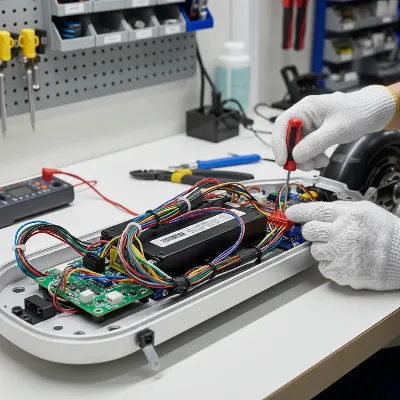 Person inspecting electric scooter internal wiring and connections
5. Perform a System Reset or Consult Manual for Error Codes
Sometimes, a temporary software glitch or an unknown error can cause your scooter to beep. A simple reset can often clear these minor electronic hiccups.
- Action: Try performing a full system reset. This usually involves turning the scooter completely off, waiting for a few minutes (e.g., 5-10 minutes) to allow all systems to power down, and then turning it back on. For some models, disconnecting the battery for a short period might be part of the reset process.
- Consult your user manual: If the beeping persists after a reset, it’s highly likely your scooter is signaling a specific error code through its beep pattern or display. Refer to your scooter’s user manual for a list of error codes and their corresponding meanings. This manual will provide the most accurate diagnosis for your specific model, guiding you towards a more targeted fix or indicating if professional service is required.
> “Many beeping issues with electric scooters are surprisingly simple to fix at home. Always start with the basics: battery, brakes, and throttle. These are the usual suspects.” – Alex Chen, Lead Technician at ElectroRide Solutions
Conclusion
An electric scooter that constantly beeps can be more than just an annoyance; it’s often a crucial warning sign that something isn’t right. By understanding the common culprits—ranging from low battery levels and faulty brake sensors to loose wiring and internal error codes—you empower yourself to quickly diagnose the issue. The five DIY fixes outlined above provide a practical starting point for resolving many of these problems, potentially saving you time and money on professional repairs.
Remember, safety should always be your top priority. If you’ve tried these quick fixes and the beeping persists, or if you encounter any issues beyond your comfort level, it’s always best to consult a qualified electric scooter technician. Regular maintenance and attentive troubleshooting ensure your electric scooter remains a reliable and enjoyable mode of transport. Are you ready to take charge of your scooter’s health and enjoy beep-free rides?
Frequently Asked Questions
Why does my electric scooter keep beeping even after I charge the battery?
If your scooter keeps beeping after a full charge, the issue might not be the charge level but rather a loose battery connection, a faulty battery itself, or another component entirely, such as a sticking brake sensor or an error code related to the motor or controller. Check all connections and refer to your manual for specific error codes.
Can a loose wire cause my electric scooter to beep?
Yes, absolutely. Loose or damaged wiring can disrupt communication between different components of your electric scooter, such as the battery, controller, or motor. This disruption can trigger error signals, which your scooter translates into audible beeps to alert you of the problem.
What should I do if my electric scooter is beeping and won’t move?
First, check for a low battery and ensure both brake levers are fully disengaged. If those aren’t the issue, try turning the scooter off and on again (a soft reset). Then, consult your user manual for any error codes indicated by the beeping pattern, which will guide you to the specific problem.
Is it normal for an electric scooter to beep when I turn it on or off?
Yes, it is often normal for an electric scooter to emit a short beep or series of beeps when it is powered on or off. These sounds are typically confirmation signals that the scooter’s system is activating or deactivating correctly. Always refer to your scooter’s manual to understand its specific power-on/off sequences.
Frequently Asked Questions
Why does my electric scooter keep beeping even after I charge the battery?
If your scooter keeps beeping after a full charge, the issue might be a loose battery connection, a faulty battery, a sticking brake sensor, or an error code related to the motor or controller. Always check all connections and refer to your scooter's manual for specific error codes to diagnose the problem accurately.
Can a loose wire cause my electric scooter to beep?
Yes, absolutely. Loose or damaged wiring can disrupt communication between different components of your electric scooter, such as the battery, controller, or motor. This disruption triggers error signals, which your scooter translates into audible beeps to alert you of the problem, requiring immediate attention.
What should I do if my electric scooter is beeping and won't move?
First, check for a low battery and ensure both brake levers are fully disengaged. If these aren't the issue, try turning the scooter off and on again for a soft reset. Then, consult your user manual for any error codes indicated by the beeping pattern, which will guide you to the specific problem and potential solution.
Is it normal for an electric scooter to beep when I turn it on or off?
Yes, it is often normal for an electric scooter to emit a short beep or series of beeps when it is powered on or off. These sounds are typically confirmation signals that the scooter's system is activating or deactivating correctly. Always refer to your scooter's manual to understand its specific power-on/off sequences for your model.
What are the most common reasons for an electric scooter to beep?
The most common reasons for an electric scooter to beep include a critically low or disconnected battery, activated brake sensors, throttle signal issues, or internal error codes from the motor or controller. Overheating components can also trigger a protective beeping warning.
Fix a Beeping Electric Scooter
Follow these five steps to diagnose and fix common beeping issues on your electric scooter, from checking the battery to performing a system reset.
Inspect your scooter's display for a low battery indicator and charge it fully if needed. Ensure the battery is firmly secured in its compartment and all visible terminal connections are tight and free of corrosion. A loose connection can interrupt power flow and trigger beeps.
Confirm both brake levers are fully disengaged and return freely to their neutral position. Gently jiggle each lever to check for sticking. Inspect the area around the brake levers for any damage, loose wires, or debris that might be interfering with the brake sensors, which can falsely trigger warnings.
Test the throttle for smooth operation; it should move freely and return to its resting position without sticking. Inspect the throttle's wiring connection to the main scooter body for any loose plugs or damaged cables. Re-seating loose connections can often resolve issues causing beeping.
Carefully open the scooter's deck or inspect easily accessible wiring harnesses for any visible loose wires, disconnected plugs, or frayed cables. Pay particular attention to connections leading to the motor, controller, and display. Gently push in and secure any loose plugs to restore proper electrical flow.
Perform a full system reset by turning the scooter off, waiting 5-10 minutes, and then turning it back on. If beeping persists, consult your scooter's user manual for a list of error codes and their corresponding meanings. This will provide the most accurate diagnosis for your specific model.

I’ve had my scooter for about a year and the low battery beep is usually pretty clear, but recently it was a different kind of beep. The guide on internal error codes helped me figure out it was a throttle issue. I was able to do the DIY fix and it’s running smooth again. Good stuff.
My scooter has been making a weird beeping noise for a few days now, and I was hoping to find a quick fix here. I tried checking the brake sensors and the throttle, but neither of those seemed to be the problem. It’s still beeping, so I guess I’ll have to look into the more complex error codes or take it in. A bit disappointing it wasn’t a simple solution for me.
My scooter started beeping constantly last week and I was so frustrated. I thought I’d have to take it into a shop, but the tip about checking the brake sensors totally fixed it! Turns out a tiny pebble was jamming it. So glad I found this before spending a ton on repairs.
This was a lifesaver! My scooter started beeping like crazy after a rainy ride, and I was worried about water damage. The explanation about diagnostic tools and how they protect components made me feel better. I followed the steps for checking the throttle malfunction and it worked perfectly. Back to my commute!